Overview
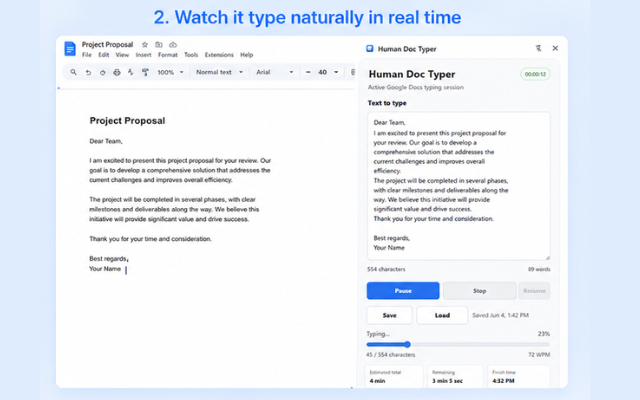
HumanDocTyper is a Chrome extension that types text into a Google Doc at a human pace. You paste in whatever you want typed, set a WPM range, and hit start. It handles the keystrokes with variable timing and natural pauses at punctuation, so the output doesn't look like it was dumped in all at once. Everything runs locally inside the tab - nothing is sent anywhere.
What It Does
Variable WPM
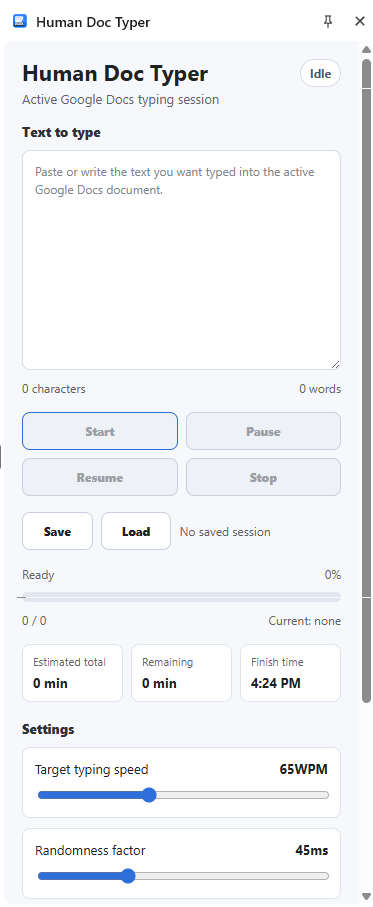
Set a min and max words-per-minute. The actual speed varies within that range on each keystroke so it doesn't feel robotic.
Pause Patterns
Short pauses between words, longer ones at commas and periods - the same rhythm people naturally fall into when typing.
Speed Presets
Calm, Normal, and Fast presets if you don't want to dial in custom numbers. Swap between them with one click.
Clipboard Input
Paste from your clipboard directly into the extension and play it back. No need to retype or reformat anything.
In-Doc Controls
A small widget floats inside the Google Doc while it's running. Start, pause, resume, and stop without leaving the page.
Local Only
No network calls, no account, no telemetry. The extension runs entirely inside your browser tab.
Extension Preview
Examples
Scenario
Screen recording
You need a doc to fill in on screen at a readable pace. Set it to 70 WPM and record while it types - no manual performance needed.
Scenario
Hands-free transcription
You've got a draft in another tool and want it in Google Docs. Paste it in, hit play, do something else while it fills in.
Scenario
Tutorial demo
Recording a walkthrough and want the doc to appear to be typed live? Pick a profile, start it, and capture the screen.
Built With
Manifest V3
Current Chrome extension architecture. Uses a service worker and content scripts scoped only to docs.google.com.
WebExtensions API
Same code runs on other Chromium browsers too - Brave, Arc, Vivaldi.
Vanilla TypeScript
No frameworks. Keeps the extension small and the overhead inside the doc tab close to zero.
Add HumanDocTyper to Chrome
Free. Works in any Google Doc right away.
No account needed. Everything stays local.
 Add to Chrome